Sponsored transactions#
At a glance
This is a two-part tutorial series on implementing sponsored transactions on Concordium, where a sponsor service pays transaction fees on behalf of users. After reading this overview, you will understand the two-part architecture — a secure backend sponsor service and a React frontend — and be ready to follow each part in order.
Sponsored transactions allow users to interact with the Concordium blockchain without paying transaction fees themselves. Instead, a sponsor wallet covers the fee on behalf of the user.
This tutorial walks through a frontend/backend architecture for sponsored transactions, focusing on clarity so you can adapt it to your own project. The tutorial has two parts:
Set up a sponsor service - A secure backend service that holds the sponsor wallet’s private key, creates transactions, and signs them on behalf of the sponsor.
Create a sponsored transaction - A frontend implementation that requests sponsorship from the backend API and submits the transaction through the user’s wallet.
Note
A full working example of a dApp using sponsored transactions is available on GitHub.
Note
For production use, keeping the sponsor private key on a secure backend is essential. The examples use @concordium/web-sdk version 12.0.0. See the Transaction.sponsor function documentation for details.
Prerequisites#
Before starting this tutorial, you should have:
Node.js and npm installed
A Concordium wallet with CCD funds for the sponsor account
Access to a Concordium node (gRPC endpoint)
@concordium/web-sdkversion 12.0.0 or later
How sponsored transactions work#
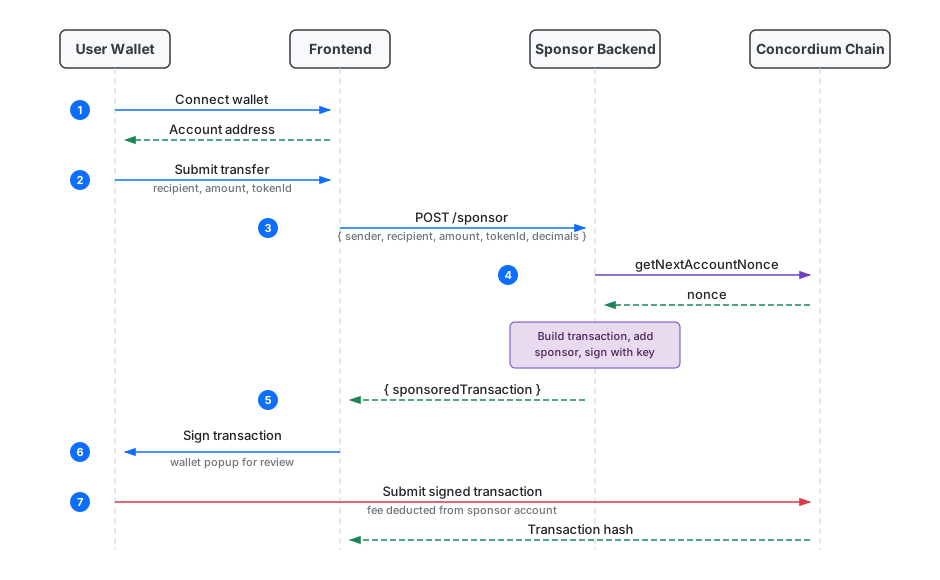
In a standard transaction, the sender pays the transaction fee. With sponsored transactions, a sponsor account pays the fee instead — making it possible to onboard users who don’t yet hold CCD, or to offer a seamless experience in your dApp.
The following diagram shows the full flow between the user’s wallet, frontend, sponsor backend, and the Concordium chain: